Tailored CAFM system · RFM App + WebCAD
Tailored CAFM software your team will actually use.
We design and deploy a clear solution for assets, inspections, maintenance, documents and tasks. We start with a pilot and enable only the functions that genuinely help your operation.
Your CAFM configuration
01 / SCOPE
Select only the workflows you need
Configured scope
Focused operating core
Add further modules only when they create value.
Why tailored CAFM
Do not pay for complexity.
Pay for a solved operation.
We start with one site or workflow. We validate data, roles and working procedures before expanding the solution. The budget reflects the real scope, and the team receives a tool that fits its day-to-day technical operations.
Built on a proven core
RFM App provides the common core. We tailor roles, forms, approvals, dashboards and integrations instead of rebuilding the entire system for every client.
Pilot before a major commitment
Validate data and user workflows at one site. Before scaling, you know the working scope, next steps and cost.
An interface people understand
Each role sees only the tasks and information it needs. Technician, manager and owner work in one system, each with the right view.
Who it is for
One core, different operating environments.
We configure CAFM around your asset structure, roles and obligations—not a universal template.
Owners and asset managers
Visibility across the portfolio, asset condition, documents, deadlines and open risks.
Facility and technical teams
Maintenance planning, inspections, defects, tasks, contractors and service history in one workflow.
Logistics and industrial sites
Buildings, technical equipment, roads and spatial data connected through RFM App and WebCAD.
Optional workflows
Build your digital operation layer by layer.
You can start with asset records and statutory inspections. Add maintenance, reporting or integrations only when they make operational and economic sense.
STATUTORY INSPECTIONS
Due in 28 days
Electrical inspection · RH1
The inspector creates the record directly in the system, adds measurements and photographs, and submits it for approval.
Responsible personInspector
StatusScheduled
Last inspection12 Oct 2025
Documents3 attachments
Next stepStart electronic inspection
A practical first step
Validate CAFM at one site or in one workflow.
Together we define the data, roles, outputs and acceptance criteria. After the pilot, you know what works and what is worth scaling.
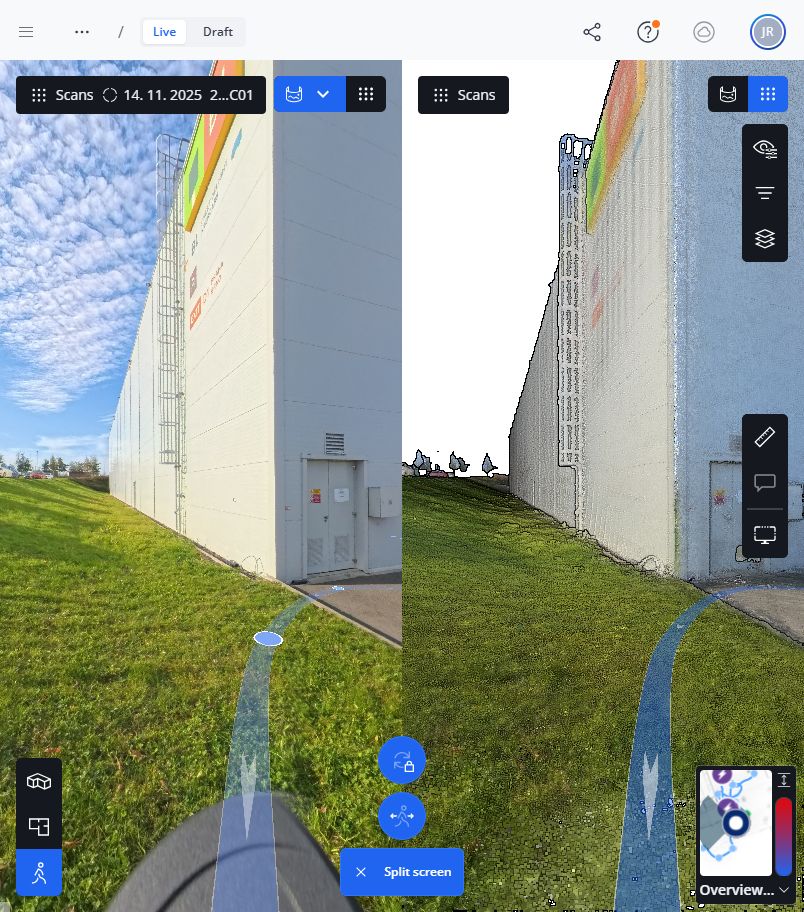
WebCAD · spatial layer
Space is not an attachment. It is part of the workflow.
WebCAD complements CAFM where a table or asset card is not enough. In the browser it connects the place, drawing and operational information without opening full desktop CAD.
- Find the place and assetQuick orientation in a building, site or extensive area.
- Work with evidence360° imagery, point clouds, drawings and related documentation.
- Update project documentsPrepare document changes, for example for a change of use.
- Bring the change into operationsThe updated spatial record connects to assets, tasks and inspections in RFM App.
Electronic statutory inspections
The inspection is created in the system—not lost as an attachment.
Form, evidence, signature, approval and next due date can all be managed in one controlled workflow. Exact scope and templates are configured to the asset, statutory obligations and client responsibilities.
Plan
Asset, deadline and responsible person.
Conduct on site
Checkpoints, readings, photographs and defects.
Approve and retain
Controlled approval and traceable history.
Schedule the next due date
Automatic trigger for a new task.
Fast and cost-efficient
Cost grows only when the system creates value.
We do not promise a generic price without understanding the operation. Instead, we separate the essential core, one-off data processing and optional development, so the client can see exactly what they are paying for.
Pilot
One site, clear workflows and acceptance criteria.
Validate valueScale
Additional workflows, users, sites or integrations.
Scale with adoptionOperate
Licence, support, data updates and further development.
Keep costs under controlFrom requirements to operations
Four decisions instead of a long project in the dark.
Understand the operation
Roles, assets, obligations, existing data and the most costly weak points.
Scope the pilot
One site or workflow, measurable outputs, timing and budget.
Configure RFM and WebCAD
Data model, forms, access rights, spatial layer and required integrations.
Deploy and grow
Training, support and further modules only where actual use justifies them.
Frequently asked questions
What to know before starting a pilot.
What is a CAFM system?
CAFM (Computer-Aided Facility Management) brings information about buildings, equipment, documents, inspections, maintenance and tasks into one environment for managing operations.
How is RFM App different from large CAFM suites?
We build on a proven core but configure only the roles, forms, workflows and dashboards the client will actually use. The scope can expand gradually after validation.
How does the pilot rollout work?
We select one site or workflow, define the required data and measurable outputs, configure the solution and jointly evaluate the next stage.
Can existing data and documents be used?
Yes. We first review available spreadsheets, drawings and documents. Usable material is transferred into the data model, while missing information can be captured in the field.
How do RFM App and WebCAD work together?
RFM App manages assets, inspections, maintenance and tasks. WebCAD adds spatial context, drawings and browser-based work with technical documentation.
How much does the solution cost?
Pricing depends on pilot scope, the quantity and quality of data, number of sites, modules and integrations. We prepare a proposal after a short review of the actual requirement.
Start with one process
Tell us one process you need to bring under control.
Tell us the type of site, the tools you use today and the biggest operational issue. We will propose a sensible pilot scope, the data required and the next steps—without unnecessary modules.
rainer@rvservices.cz → +420 703 123 807 In your message, include the site, number of users and the workflow you want to address first.Selected clients